
Have you ever searched for Winbuzz online and felt uncertain about which link to click? You are not alone. As Winbuzz has grown into one of the most talked-about online betting and gaming platforms in India, a troubling trend has emerged alongside its popularity: a surge of fake, copycat, and phishing websites designed to look exactly like the real thing.
These fraudulent sites are not just harmless imitations. They are sophisticated traps that steal login credentials, siphon deposited funds, and leave users with no legitimate recourse. In 2026, identifying the official Winbuzz website before you register, deposit, or even log in is not just good practice — it is essential for protecting your money and your personal information.
This guide will walk you through everything you need to know: what makes the official Winbuzz website unique, how to identify fake Winbuzz sites, the warning signs every user must recognise, and the steps you should take if you ever suspect you have landed on an imposter platform. Whether you are a first-time visitor or a long-time user, this is the definitive 2026 resource for staying safe.
Why Fake Winbuzz Websites Are Such a Serious Problem
The rise of fake gaming and betting websites is a global phenomenon, but it has hit the Indian market with particular force. Winbuzz, as a leading platform offering sports betting, casino games, and live dealer experiences, naturally attracts attention — both from genuine users and from bad actors looking to exploit the brand’s reputation.
Fake Winbuzz websites operate through several models. Some are straightforward phishing sites: they mimic the login page of the official Winbuzz website, capture your username and password, and use those credentials to access your real account elsewhere. Others function as full deposit scams — they allow you to create an account, deposit real money, and even let you “win” initially, before locking your account and disappearing with your funds. A third category involves fake mobile apps distributed through unofficial channels that request excessive permissions or install malware on your device.
The financial and personal data losses from these scams can be devastating. Unlike transactions on the legitimate official Winbuzz website, payments made to fraudulent platforms have no protection. Once your money is gone, it is almost impossible to recover. This is why recognising the one real platform — and knowing how to verify it — is so critical.
The Official Winbuzz Website: What You Need to Know
The One Verified Domain
The first and most important rule in identifying the official Winbuzz website is to know the correct domain. Fake websites frequently use domain names that look almost identical to the real one — swapping letters, adding hyphens, using different domain extensions, or inserting words like “official,” “real,” or “login” into the URL.
Before you type anything into a Winbuzz-branded website, examine the URL bar carefully. Confirm you are on the correct, verified domain that Winbuzz officially publishes through its communications and verified social media channels. Bookmark that URL immediately and use only that bookmark for future visits. Never search for Winbuzz on a search engine and click the first sponsored result without verifying the URL — paid advertisements can and do feature fraudulent domains.
HTTPS and SSL Certificate Verification
Every legitimate online platform today uses HTTPS — the secure version of the HTTP protocol that encrypts data between your browser and the server. The official Winbuzz website will always display a padlock icon in your browser’s address bar and begin with “https://” rather than “http://”.
However, this alone is not sufficient verification. Fake sites can also obtain SSL certificates, meaning a padlock does not automatically mean a site is legitimate. After confirming HTTPS is present, click on the padlock icon and review the certificate details. A legitimate Winbuzz certificate will be issued to the correct company entity and domain — any mismatch or unfamiliar issuing organisation should raise an immediate red flag.
Official Winbuzz Branding and Design Standards
The official Winbuzz website maintains a consistent, professional visual identity. The logo, colour palette, typography, and layout are standardised and do not change arbitrarily. Fake sites often have subtle but detectable differences: slightly off-colour logos, misaligned elements, low-resolution images, or outdated page designs that no longer match the current official platform.
If something about a Winbuzz-branded site looks slightly different from what you remember, trust your instincts and verify the URL before proceeding. Fraudulent designers often work from screenshots of the real site and cannot perfectly replicate every element, especially after the official platform updates its interface.
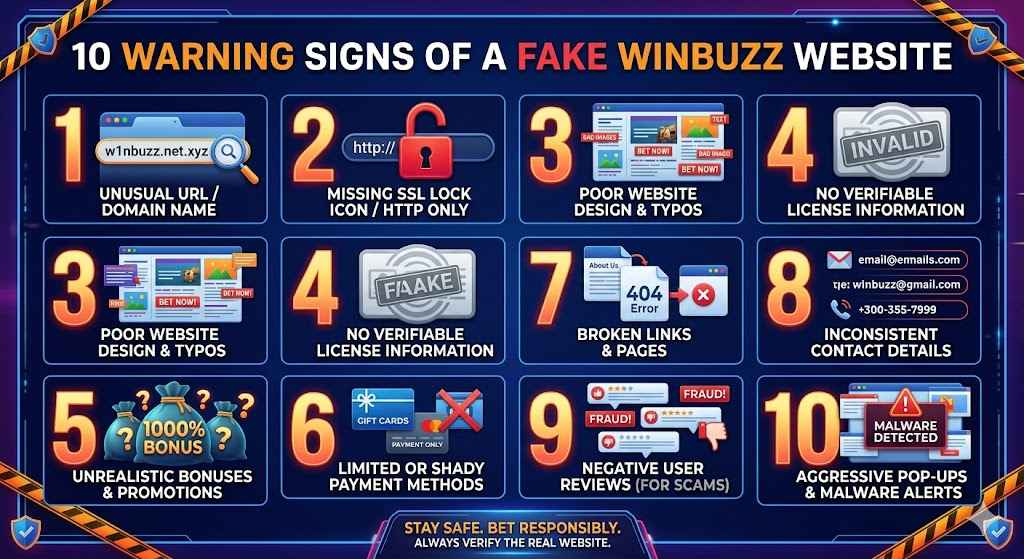
10 Warning Signs of a Fake Winbuzz Website
Knowing the specific red flags is your most practical defence. Here are ten warning signs that a Winbuzz-branded site you are viewing may be fraudulent:
- The URL does not exactly match the verified official Winbuzz domain — look for extra words, hyphens, number substitutions (“w1nbuzz”), or different extensions (.net, .co, .info instead of the correct one).
- The site was found through a sponsored search result or unsolicited link in a WhatsApp group, Telegram channel, or SMS message.
- The login or registration page looks slightly different from the version you have used before — different font sizes, shifted elements, or a different colour on the header.
- The site offers an unusually generous welcome bonus that far exceeds what the official Winbuzz website advertises through its verified channels.
- Payment options include unofficial or untraceable methods — particularly cryptocurrency wallets, direct bank transfers to personal accounts, or UPI IDs you do not recognise.
- Customer support links are broken, lead to generic contact forms, or provide email addresses on free domains like Gmail or Yahoo rather than an official Winbuzz business email.
- The website has no clear licensing information, responsible gambling policy, or terms and conditions — or these pages are copied verbatim from another site with wrong details.
- You are prompted to download an APK or app from the website itself rather than being directed to an official app store listing.
- Withdrawal requests are consistently delayed, blocked, or met with unusual “verification” requirements that were never mentioned during registration.
- The site requests your Aadhaar number, PAN card details, or bank account information at registration without clear legal justification or a visible privacy policy.
| IMPORTANT SAFETY WARNING If you recognise two or more of these warning signs on a site you are currently using, stop all activity immediately. Do not make any further deposits. Do not enter any additional personal information. Change your password on any other platform where you use the same credentials, and contact the official Winbuzz support team to report the fraudulent site. |
Fake vs Official Winbuzz Website: A Side-by-Side Comparison
| Feature | Official Winbuzz Website |
| URL / Domain | Exact verified domain — no variations, hyphens, or substitutions |
| SSL Certificate | HTTPS with certificate issued to the correct Winbuzz company entity |
| App Distribution | Official app stores only — never third-party APK downloads |
| Bonuses | Clearly stated terms, wagering requirements, and expiry dates published on-site |
| Payment Methods | Licensed payment gateways, recognised bank partners, and verified UPI channels |
| Customer Support | 24/7 live chat, official email on Winbuzz domain, verifiable phone/WhatsApp |
| Licensing Info | Clearly displayed license number, jurisdiction, and responsible gambling links |
| Withdrawal Process | Defined SLA for processing, transparent KYC requirements stated upfront |
| Contact Channels | No requests for credentials or sensitive data through unofficial channels |
| Branding | Consistent professional design across all pages, updated with current promotions |
How Scammers Create Convincing Fake Official Winbuzz Website
Understanding how these fraudulent platforms are built helps you spot them more effectively. Scammers do not start from scratch — they use a technique called website cloning. Automated tools can create a near-perfect copy of the official Winbuzz website in minutes, capturing every image, layout element, and CSS style from the real site.
The clone is then hosted on a domain that costs as little as a few dollars and may be active for only a few weeks before the scammers abandon it and launch a new one. This short lifespan is intentional: it avoids prolonged scrutiny and makes it harder for users to find negative reviews or reports about that specific domain.
Distribution happens primarily through three channels. First, paid search advertising — scammers bid on keywords like “Winbuzz login” or “official Winbuzz website” and pay to have their fraudulent domain appear above the real one in search results. Second, referral networks — affiliates who are either knowingly or unknowingly promoting fake platforms through social media posts, YouTube videos, and messaging apps. Third, SMS and WhatsApp phishing — bulk messages that claim to offer exclusive bonuses or urgent account notifications, with links to the fake site.
Some sophisticated operations go further, creating fake “review” websites that claim to independently verify the fraudulent platform as legitimate, or fabricating screenshots of large “withdrawals” to build false credibility on social media.
Step-by-Step: How to Verify You Are on the Official Winbuzz Website
Step 1 — Start from a Trusted Bookmark
The simplest and most reliable protection is never searching for Winbuzz at all. Set a bookmark to the verified official Winbuzz website the first time you visit it through a trusted source — the official Winbuzz social media pages, verified press coverage, or a direct link from an email you requested (such as a password reset). Use that bookmark exclusively for every future visit.
Step 2 — Inspect the Full URL Before Interacting
Every time you load a official Winbuzz website branded page, look at the complete URL in your browser’s address bar — not just the visible page title or logo. The full domain should match exactly. Expand the bar if necessary to see the entire URL, as some browsers truncate long addresses. Pay special attention to the characters immediately before the first forward slash after the domain: this is where fake sites insert their variations.
Step 3 — Check the SSL Certificate Details
Click the padlock icon next to the URL and select “Certificate” or “Connection is secure” depending on your browser. Review the “Issued to” field. It should reference a legal entity consistent with the Winbuzz operating company — not a generic name or an individual’s name. If anything seems unusual, leave the site immediately.
Step 4 — Verify Contact and Licensing Information
Scroll to the bottom of any page on the official Winbuzz website. Legitimate operators prominently display their licensing information, responsible gambling links, and official contact details. Cross-reference any license number you find against the issuing regulatory body’s public database. If there is no licensing information at all, or it appears copied from another operator, treat the site as suspect.
Step 5 — Use Official Winbuzz Channels to Confirm
If you have any doubt at all, contact Winbuzz through a verified channel — their official customer support chat or email — before making any transaction. Ask them to confirm whether the URL you are viewing is an authorised domain. The official Winbuzz team will never ask you to share your password or full payment card details through these channels.
What to Do If You Have Used a Fake Winbuzz Website
If you believe you have already interacted with a fraudulent site impersonating Winbuzz, take the following steps immediately and in this order:
- Change your password on the official Winbuzz website and on any other platform where you use the same email and password combination.
- Contact your bank or payment provider to report any unauthorised transactions and request a chargeback or investigation where applicable.
- Report the fraudulent URL to the official Winbuzz support team so they can take legal action and warn other users.
- File a report with the Cyber Crime portal of the Indian government at cybercrime.gov.in, providing the fraudulent URL, any transaction records, and screenshots.
- If you shared identity documents (Aadhaar, PAN), consider alerting the relevant Indian government authority and monitoring for any identity misuse.
- Warn others in your network — share your experience responsibly so friends and family avoid the same trap.
Time is critical in these situations. The faster you act, the greater the chance of limiting your losses and preventing further misuse of your personal data.
How to Safely Access Winbuzz on Mobile
Mobile users face additional risks because smaller screens make it harder to inspect URLs and because unofficial app stores and APK sharing are more common in the mobile ecosystem. Here is how to stay safe when using Winbuzz on a smartphone or tablet.
Only Install from Official App Stores
The official Winbuzz app, where available, will be distributed through the Apple App Store or Google Play Store under the verified Winbuzz developer account. Always search for Winbuzz within the store rather than clicking links that claim to take you to the app listing. Verify the developer name, number of reviews, and download count before installing.
Never install a Winbuzz APK file sent through WhatsApp, Telegram, or any other messaging channel. Even if the message appears to come from a friend or a seemingly legitimate group, APK files from unofficial sources can contain malware that compromises your entire device — not just your Winbuzz account.
Enable Two-Factor Authentication
Two-factor authentication (2FA) adds a critical second layer of security to your official Winbuzz account. Even if a phishing site obtains your username and password, they cannot access your account without the time-limited code sent to your registered mobile number or authenticator app. Enable 2FA in your account security settings immediately if you have not already done so.
Avoid Public Wi-Fi When Accessing Winbuzz
Public Wi-Fi networks in cafes, airports, and hotels are prime targets for man-in-the-middle attacks where a third party intercepts your connection. If you must use public Wi-Fi, always connect through a reputable VPN service before opening the official Winbuzz website or app. Better still, use your mobile data connection for any activity involving account access or financial transactions.
Staying Updated: How Winbuzz Communicates Official Changes
A common scammer tactic is to exploit moments when the official Winbuzz website undergoes updates, maintenance, or domain changes. Users searching for the platform during these windows may be more susceptible to landing on a fake site that appears to be “the new version.”
The official Winbuzz website and its verified social media channels are the only authoritative sources for platform updates, new domain announcements, or maintenance notices. Follow Winbuzz on its official, verified social media profiles and subscribe to email notifications through your account settings. Treat any unsolicited message claiming Winbuzz has moved to a new domain with extreme scepticism — always verify through official channels before visiting a new URL.
Winbuzz will never ask you to re-register, re-verify your identity from scratch, or re-deposit funds due to a “system migration.” If you receive such a request through any channel, it is a scam. Report it immediately.
Frequently Asked Questions About the Official Winbuzz Website
How do I find the official Winbuzz website?
Access Winbuzz only through a verified bookmark you set from a trusted source, or through the direct link published on Winbuzz’s official verified social media pages. Never rely on search engine results or unsolicited links.
Does Winbuzz have multiple official domains?
Winbuzz operates under a primary verified domain. Any website other than the officially published domain claiming to be Winbuzz should be treated as potentially fraudulent until you have verified it through the official Winbuzz customer support team.
What should I do if the official Winbuzz website is blocked in India?
If you encounter access issues, contact the official Winbuzz support team through verified channels to obtain guidance on legitimate alternative access methods. Do not use third-party “mirror” sites promoted by unofficial sources, as these may be fraudulent or may expose your account data.
Is it safe to use Winbuzz on mobile?
Yes, when using the official Winbuzz app downloaded from an authorised app store, or when accessing the official Winbuzz website through a verified bookmark on a secure connection. The risks arise exclusively from unofficial apps and fraudulent sites — not from mobile usage itself.
How does Winbuzz protect users from fake sites?
Winbuzz actively monitors for and reports fraudulent domains using its branding. The platform also educates users through official communications about safe access practices. However, the most effective protection is user awareness — which is precisely why resources like this guide exist.
Conclusion: The Official Winbuzz Website Is the Only Safe Choice
In a digital landscape full of sophisticated fraudsters, your best defence is informed vigilance. The official Winbuzz website offers a secure, licensed, and professionally managed platform where you can enjoy sports betting, casino games, and more with confidence. The impostors cannot offer any of that — only the illusion of it, until they vanish with your money.
Remember the core principles from this guide: always access Winbuzz through a verified bookmark, inspect the URL meticulously every single time, look for proper HTTPS certification and licensing information, and never act on unsolicited links or messages that claim to be from Winbuzz. Enable two-factor authentication on your account today if you have not done so already.
The fake Winbuzz websites bank on users being in a hurry, distracted, or simply unaware. Now that you are aware, you hold the advantage. Use it. Share this guide with fellow Winbuzz users — the more people who know how to spot fake Winbuzz sites, the harder it becomes for scammers to operate.
Ready to play safe? Visit the official Winbuzz website through your verified bookmark and enjoy the full, secure Winbuzz experience today.
| RESPONSIBLE GAMBLING DISCLAIMER Online betting involves financial risk. Only bet what you can afford to lose. If gambling is affecting your wellbeing, please seek support from a licensed counselling service. Always verify local laws regarding online betting before registering or depositing funds. |